Cupcake Buzz Launcher Theme1.0.0
Publisher Description
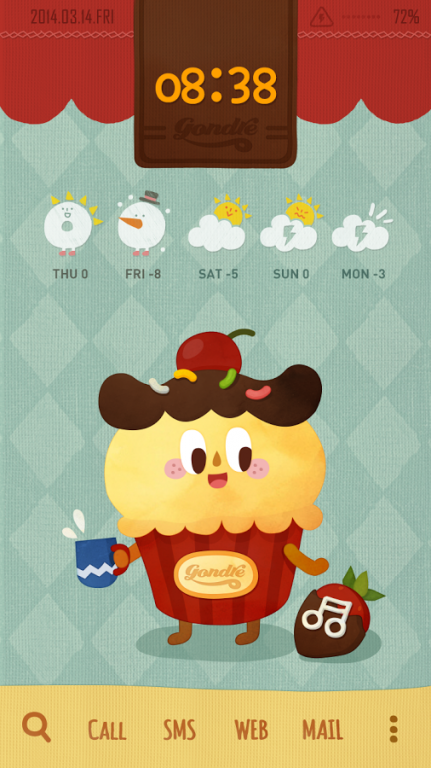
This Valentine's day give your phone a touch of sweetness <3
Homepack filled with chocolate, cupcake, and biscuit!!
Have a sweet Valentine's day with Gondre's treat-packed homepack :)
============================
★ How to apply this theme ★
============================
✓ Install and run the application. If you already have Buzz Launcher, your theme will be automatically applied.
✓ If you do not have the Buzz Launcher yet, get it here at http://goo.gl/37EOa! This theme is applied automatically when you install Buzz Launcher.
✓ Now, enjoy your Buzz Launcher Theme on your mobile phone!
※ Check out other themes on Buzz Launcher! ☞ http://buzz.daum.net/
============================
★ Why Buzz Launcher?。 ★
============================
♡. What is a ‘Homepack’? It is a new type of theme package that will help you change your mobile wallpaper, icons, applications, and widgets with a single touch of a button!
♡. This themes and 300,000+ other homepack themes are FREE.
♡. Your homepack theme will be installed automatically after download.
♡. Multiple ways to decorate your mobile phone. We provide multi-backgrounds, personal icons, and more!!!
★ Note ★
☆ Available from Android 4.0.3+ (ICS or Above)
☆ Now available on Google Nexus 7
★ E-mail ★
help@buzzpia.com
About Cupcake Buzz Launcher Theme
The company that develops Cupcake Buzz Launcher Theme is Buzz Launcher Theme. The latest version released by its developer is 1.0.0.
To install Cupcake Buzz Launcher Theme on your Android device, just click the green Continue To App button above to start the installation process. The app is listed on our website since 2014-03-12 and was downloaded 18 times. We have already checked if the download link is safe, however for your own protection we recommend that you scan the downloaded app with your antivirus. Your antivirus may detect the Cupcake Buzz Launcher Theme as malware as malware if the download link to net.daum.buzz.sweetcupcake is broken.
How to install Cupcake Buzz Launcher Theme on your Android device:
- Click on the Continue To App button on our website. This will redirect you to Google Play.
- Once the Cupcake Buzz Launcher Theme is shown in the Google Play listing of your Android device, you can start its download and installation. Tap on the Install button located below the search bar and to the right of the app icon.
- A pop-up window with the permissions required by Cupcake Buzz Launcher Theme will be shown. Click on Accept to continue the process.
- Cupcake Buzz Launcher Theme will be downloaded onto your device, displaying a progress. Once the download completes, the installation will start and you'll get a notification after the installation is finished.
